Last updated: November 20, 2026
Quick Answer: 1 rule matters most — use a patient portal to help someone else only through the access the health system gives you, usually as proxy access or with the patient’s own login. If you are unsure whether a portal action is allowed, consult the health system or a qualified professional, because privacy and consent rules vary by jurisdiction and by provider. This article is general information, not legal advice; for your own situation, a qualified lawyer should be consulted. For background on access and patient information rules in the United States, see the HHS Office for Civil Rights guidance on the HIPAA right of access and HIPAA guidance.
Key takeaways
- Use the portal the health system has set up for caregivers, not a login you were never meant to use.
- Proxy access lets one person view or act in another person’s portal, but the exact limits depend on the health system and local law.
- Messages, test results, reminders, and appointment tools are the main day-to-day features caregivers use.
- Keep records of what the portal shows and what the care team says, especially when messages affect appointments or medication.
- If the portal blocks the role you need, stop there and use the provider’s own process for caregiver access.
What a patient portal can do
A patient portal is the online account a health system uses to show health information and handle routine tasks, and it usually works best for messages, results, reminders, and appointments. For a caregiver, the main question is not “Can I get in?” but “What role has the health system given me?”
That role may be full access, limited access, or proxy access. Proxy access means one person can use the portal on behalf of the patient, but the controls are set by the health system and may differ by country, state, province, or clinic policy. For general background on access rules in the United States, the U.S. Department of Health & Human Services explains the HIPAA right of access and related patient information rules on its guidance pages, including the Office for Civil Rights site.
A portal is useful when the patient needs help with small tasks that repeat every week. It is less useful when the issue is a legal consent problem, a disputed diagnosis, or a request for official records. Those are different tools, and the HHS OCR guidance is the right place to start when access questions are about records rather than daily coordination.
How do I use a patient portal for someone else?
You use a patient portal for someone else by logging in through the access the health system has approved, then limiting yourself to the tasks that role allows. The workflow is usually: confirm the access type, sign in, check the dashboard, read messages, review results, and use the scheduling or reminder tools. In practice, that means the portal should fit the role first, then the task.
- Confirm the portal role. Check whether the account is the patient’s own login or proxy access, and verify the name shown on the account before you act. If the portal does not clearly show the patient’s name and your role, stop and contact the health system.
- Sign in through the portal. Use the portal’s official login page, not a saved link in a text message, and complete any password or two-step check the system asks for. If the portal rejects the login after a few tries, that may mean the role is wrong or the account is locked.
- Review the dashboard. Open the main screen first and check for new alerts, missed messages, upcoming visits, and unread test results. If the dashboard shows an unfamiliar account history, do not keep clicking through; that can mean you entered the wrong chart.
- Open secure messaging. Read messages from the care team and reply only within the portal’s secure messaging feature, which keeps the conversation inside the health system record. If you are unsure about whether to reply or how to phrase a message, consult the care team or another qualified professional. If the message box is missing, disabled, or labeled read-only, the account probably does not permit replies.
- Check test results. Review results with the date, test name, and any release notes the portal displays, then note whether they are marked final or preliminary. If a result appears without context, such as a reference range or a clinician note, treat it as incomplete information and ask the care team to explain it.
- Use appointment tools. Confirm upcoming visits, request rescheduling only when the portal allows it, and check whether reminders go to email, text, or in-app notifications. If the appointment list is missing future visits, the patient may be registered under a separate system or department.
- Update shared details. If the portal lets you, check contact information, emergency contacts, or pharmacy details for accuracy, then save any change the system accepts. If edits fail or disappear after refresh, the portal may require the patient to make the change directly.
- Record the result. Save or write down the message date, test date, appointment time, and any instructions you still need to follow. If the portal and the care team say different things, treat that mismatch as a problem and ask for clarification through the portal or by phone, or consult a professional if you are unsure how to proceed.
A portal works best when the caregiver uses it for routine coordination, not for guessing at medical meaning. The number of clicks is less important than the trail it leaves: message, result, reminder, and response. If that trail is missing, the portal has not done the job.
What should I check before I log in?
You should check the access type, the patient’s permission, and the health system’s portal rules before you log in. A caregiver portal is only useful if the account matches the care role.
| Check | What it tells you | Why it matters |
|---|---|---|
| Proxy access status | Whether you are allowed to act for the patient | Without it, you may only see limited data or nothing at all; if you are unsure, consult the health system or another qualified professional |
| Patient name on the account | Whether the portal is the right chart | Wrong-chart access can expose private information |
| Message permissions | Whether you can send secure messages | Some roles can read but not reply |
| Result visibility | Whether test results appear in the portal | Some results release after a delay or stay hidden |
| Appointment access | Whether you can view or change visits | Scheduling rules vary by department |
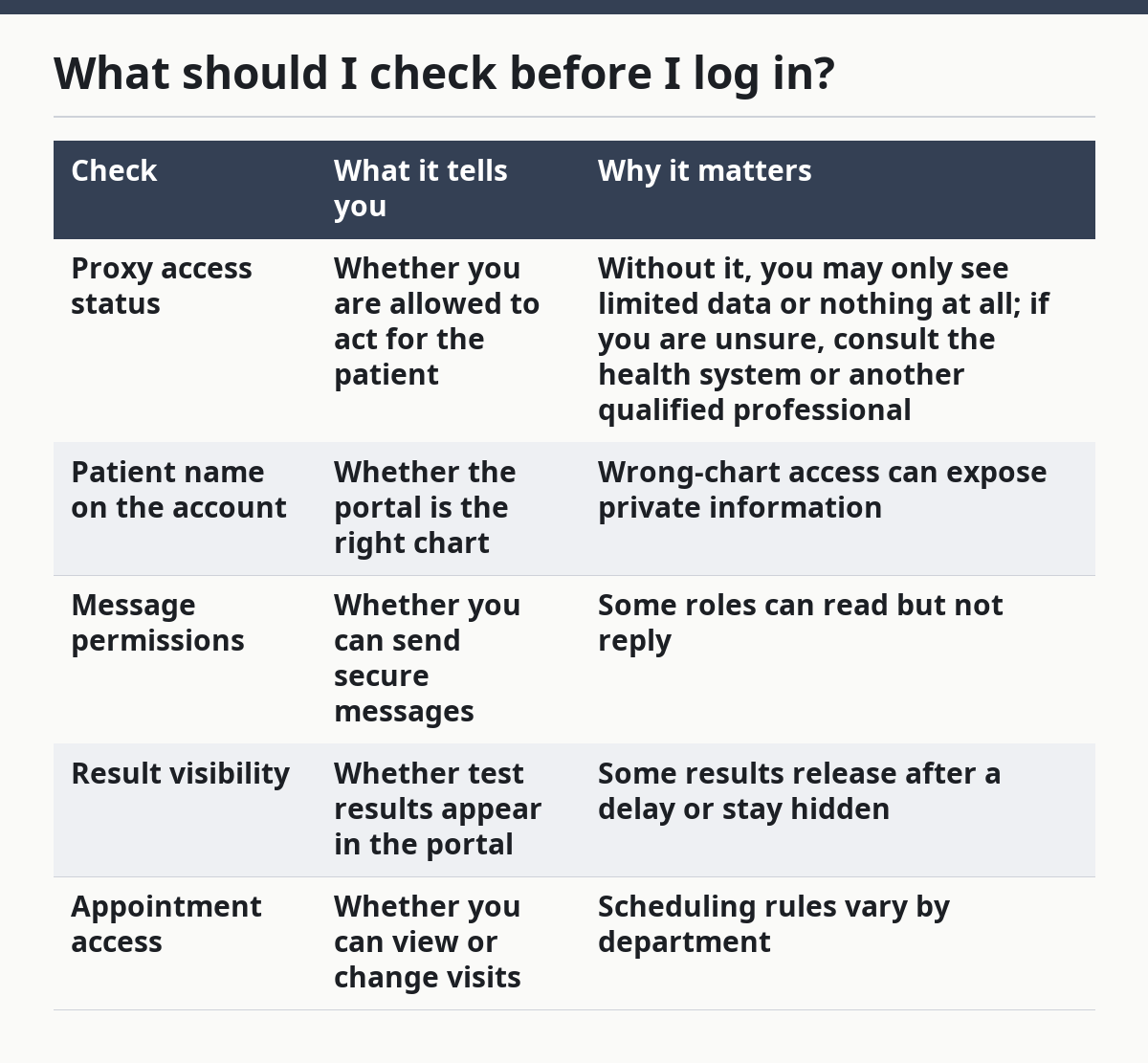
A practical check is to look for three things on the first screen: the patient’s name, the date of the newest result, and a message button. If any one of those is missing, the account may be incomplete. That matters because a caregiver often assumes the portal has the full record when it may only show part of it.
What can I do in the portal?
You can usually handle message follow-up, test-result review, appointment reminders, and basic sharing of information through the portal, but only within the permissions the health system gives. The useful features are simple, and that simplicity is the point.
Secure messaging is the main caregiver tool. It lets you send a question to the care team without using ordinary email, which is not the same thing. Messages usually work best for short updates, refill questions, and scheduling follow-up, not for urgent symptoms or legal disputes. If you are unsure whether a message belongs in the portal, consult the care team or another qualified professional.
Test results are another common use. A portal may show lab results, imaging summaries, or visit notes, depending on the system. The result may appear before a clinician has called, which can be helpful or confusing; if the portal shows a number without explanation, wait for the care team’s message or ask for one.
Appointment reminders help with planning. Many portals allow reminder settings, visit confirmations, or rescheduling requests, though the exact options depend on the health system. If the portal supports family sharing, use that instead of sharing the patient’s password.
What if the portal does not offer caregiver access?
If the portal does not offer caregiver access, the portal is not the right tool for that task. In that case, the patient may need to use the provider’s own process for permission, release, or communication, and the rules vary by jurisdiction and by health system.
That is where people often get stuck. They try to work around the problem by using the patient’s password, by guessing at shared access, or by asking staff to “just add” them informally. Those shortcuts can fail because the portal itself is tied to identity checks, consent rules, and account permissions.
| Option | What it usually gives you | Main trade-off |
|---|---|---|
| Proxy access | Portal tools under an approved caregiver role | Setup may take extra steps and may not cover every feature |
| Patient’s own login used by the caregiver | Full access if the patient allows it | Weak privacy boundaries and possible rule violations |
| No portal access | Nothing inside the account | You must use phone calls, paper forms, or the provider’s formal process |
If the portal does not support the role you need, stop using the account as a workaround. The safer path is to ask the health system what access it recognizes and to use the process that matches that system’s rules. For general legal-rights questions around records and access, the HHS OCR portal guidance is a useful place to start in the United States.
When should I stop using the portal?
You should stop using the portal and switch to another process when the access, content, or timing does not match what the care team says. A portal is a support tool, not a fix for a consent problem or an urgent medical issue.
The portal shows the wrong patient: This means the chart is not yours to use — log out at once and contact the health system’s support line.
Proxy access is missing or expired: This means the system may no longer recognize your role — use the provider’s formal access process instead of guessing.
The message concerns urgent symptoms: This means secure messaging is too slow for the problem — use the care team’s urgent contact method or emergency services if needed.
The result is marked preliminary or unclear: This means the information may change — wait for the final result or ask the care team to interpret it.
The portal blocks edits or replies: This means your role is read-only or limited — do not keep trying to force changes; ask for the right access level.
The patient objects to your access: This means the consent basis is gone — stop using the portal for that account and use another communication path.
A portal can look complete and still be the wrong tool for the moment. If the stakes shift from routine coordination to permission, urgency, or disagreement, the portal should take a back seat. The number on the screen is not the whole legal or clinical picture.
What mistakes do caregivers make?
Caregivers usually make the same few mistakes, and each one has a predictable cost. The fix is usually to slow down and use the portal as designed.
- Using the patient’s password without a proper role. The cost is privacy risk and possible account problems. The correct alternative is proxy access or the provider’s approved caregiver setup.
- Treating secure messages like emergency care. The cost is delay. The correct alternative is the urgent contact method the care team gives, or emergency help when needed.
- Assuming every test result is final. The cost is confusion and premature worry. The correct alternative is to check the result status and wait for the clinician note when needed.
- Ignoring the account name at login. The cost is wrong-chart access. The correct alternative is to verify the patient name before reading or sending anything.
- Sharing screenshots with the wrong people. The cost is accidental disclosure. The correct alternative is to use the portal’s built-in sharing tools or the provider’s formal release process.
- Missing notification settings. The cost is late replies and missed visits. The correct alternative is to check reminders, email alerts, and message alerts after each portal update.
The mistake pattern is usually not technical skill. It is assumption. A caregiver sees a familiar dashboard and assumes the whole account is open and accurate. In portal use, that assumption can be wrong in exactly the places that matter most.
What to do when the portal is not enough
The portal is not enough when you need legal authority, full medical records, or a process the system has not enabled. In those cases, the answer is not more clicking; it is a different channel.
That may mean asking the health system to confirm what proxy access exists, or using its formal records and consent process if the portal cannot do the job. It may also mean speaking with a qualified lawyer when the question is about legal rights, consent, or access limits, because those rules vary by jurisdiction and the wrong guess can shut the door later.
For day-to-day caregiving, though, the portal still does useful work. It can reduce missed messages, keep appointments visible, and make test follow-up easier. That is the practical value: less searching, fewer phone trees, and one place to check what the care team has already said.
If you need a broader picture of caregiver legal access and records, this topic sits within that larger set of rules and tools.
What is proxy access in a patient portal?
Proxy access is a permission set that lets one person use a patient portal on another person’s behalf. It usually depends on the health system’s rules and the patient’s consent, and the exact features can be full or limited. In some systems, proxy access covers messages and appointments; in others, it only shows selected parts of the chart. If the setup is unclear, consult the health system before acting.
Can I read lab results through a portal as a caregiver?
Yes, if the health system gives your portal role permission to see them. Some portals show lab results, imaging summaries, and visit notes, but the timing and detail level vary by system. If the result appears without explanation, or if it is marked preliminary, wait for the care team to clarify it.
What if the portal does not offer caregiver access?
If the portal does not offer caregiver access, the portal is not the right route for that task. Use the health system’s own process for permission, communication, or records, because the rules vary by jurisdiction and provider. If the issue is legal authority or consent, a qualified lawyer should be consulted.
Drafted with AI; not yet reviewed by a person.