Last updated: November 20, 2026
Quick Answer: in 1 written request, a caregiver can often ask for copies of medical records by sending the records office the patient’s identifiers, the right authorization form, and clear instructions for paper or electronic copies. This article covers how to request copies of medical records as a caregiver. The exact rules vary by jurisdiction and by provider, and this is general information, not legal advice; a qualified lawyer should be consulted for a specific situation. For federal background on patient access, see the HHS Office for Civil Rights medical records guidance and the HIPAA Right of Access fact sheet.
Key takeaways
- The request usually goes to the medical records department or health information management office, not to the nurse at the desk.
- Patient identifiers matter. A name alone is often not enough.
- Some providers want a signed authorization form before they release copies of records.
- Ask for the format you can actually use: paper, PDF, or another electronic copy.
- Processing can take time, so a complete request is faster than a vague one.
- If the patient cannot consent, has died, or the record is part of a special case, the standard process may change.
Who can make the request?
A caregiver can make the request only if the provider accepts that person’s authority to ask for copies of records. In many settings, the request must come from the patient, a legal representative, or someone who has written permission. A friend or family caregiver without that authority may be turned away, even if they handle appointments every week.
This is where people often get stuck. The medical records department may ask for proof of identity, proof of relationship, or a signed authorization form before it sends out copies of records. That is normal. It is also why a caregiver should not assume that helping with care automatically means access to the chart.
Instead of treating access as automatic, check what the provider asks for before you send anything. Some offices will accept a form at the front desk, while others route requests through the health information management office. If the patient can sign, that usually makes the process simpler. If the patient cannot sign, the rules may depend on local law and the provider’s policy.
This page belongs in the broader caregiver legal access and records topic, because record requests and permission rules often sit together. That does not mean every caregiver gets the same access; it means the same records can have different access paths.
What do I send with the request?
A complete request includes the patient’s identifiers, the destination for the records, and the format you want. Most offices need enough information to match the request to the correct chart without guessing. A full legal name, date of birth, and another identifier such as medical record number are common examples of patient identifiers.
The request should also say where the copies of records should go. That can be an email address, a mailing address, a fax number, or a pickup location, if the provider allows it. If the provider offers a standard authorization form, use that form first unless the office tells you to do something different.
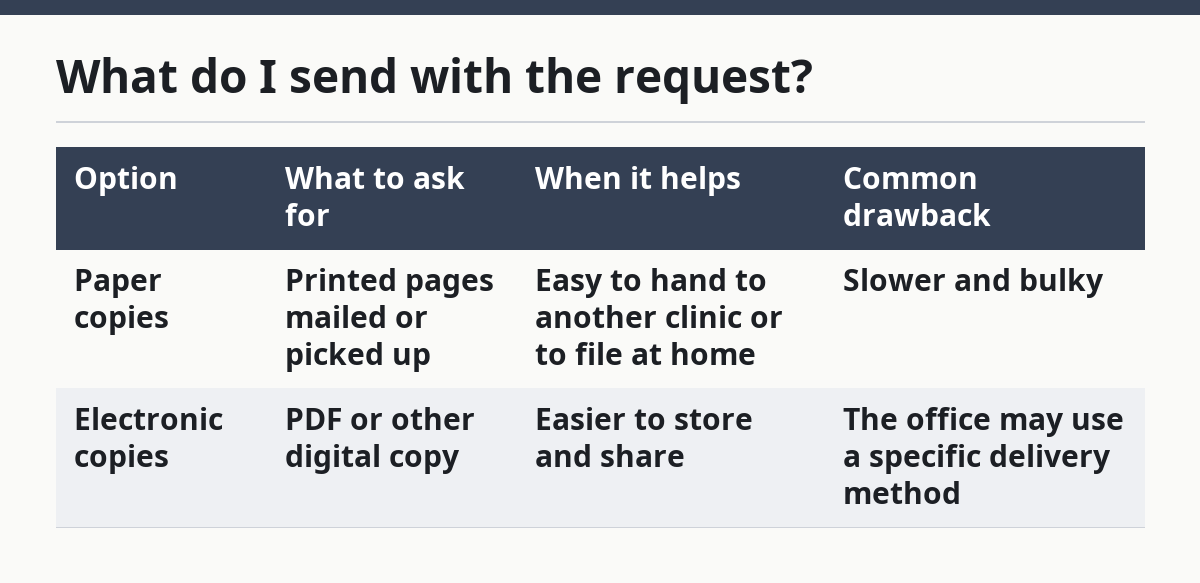
Here is the practical difference between asking for paper and asking for electronic records:
| Option | What to ask for | When it helps | Common drawback |
|---|---|---|---|
| Paper copies | Printed pages mailed or picked up | Easy to hand to another clinic or to file at home | Slower and bulky |
| Electronic copies | PDF or other digital copy | Easier to store and share | The office may use a specific delivery method |
If the request is missing an identifier, a signature, or the wrong destination, it can sit in the queue while staff wait for clarification. That can add days or longer, depending on the office workflow. A short, complete request usually works better than a long, unclear one.
How do I request copies of medical records?
A caregiver requests copies of medical records by sending a written request to the right office, filling out the authorization form, and stating exactly what records are needed. The goal is not just to ask for “everything,” but to make it easy for the records team to find the right chart and send the right pages.
- Medical records request form: Get the provider’s own form from the medical records department or health information management office, and check that it asks for the patient’s name, date of birth, and contact details; if the form is missing a signature line or release section, it is the wrong form.
- Patient identifiers: Enter the patient’s full legal name, date of birth, and any record number the office asks for; verify the spelling and numbers against the chart, because a mismatch can send the request back unprocessed.
- Authorization form: Sign the form only where the office asks for a patient signature or representative signature, and include any date required; if a signature is missing, the records office may not release copies at all.
- Records list: Name the records you want, such as visit notes, lab results, imaging reports, or discharge papers, and add the date range if the office allows it; if the request is too broad, the office may ask you to narrow it.
- Delivery method: Choose paper or electronic copies and write the destination clearly, such as mail, pickup, or secure electronic delivery; if you are unsure which format is best, ask the provider’s records office or a qualified professional and check the provider’s release instructions. See the HHS OCR access guidance.
- Submission channel: Send the request to the medical records department or health information management office by the method the provider accepts, such as in person, mail, fax, or an online form; if you send it to the wrong desk, it can stall without warning.
- Tracking note: Keep a copy of the request, the date sent, and the name of the office that received it; if the office later says it never got the request, you can show exactly what was sent.
- Follow-up date: Check back after the provider’s stated processing time, which often depends on office workload and the type of record requested; if the office gives you a new form or a missing-item list, complete that promptly to avoid another delay.
A request that is complete on the first try is the one most likely to move smoothly. A request with missing identifiers, no signature, or no delivery address usually circles back for correction.
Where should I send it?
You should send the request to the medical records department or the health information management office, because that is usually where copies of records are processed. Sending it to the right office matters more than sending it to the first person who answers the phone.
In some settings, the front desk can hand you the form, but the desk staff may not process the request themselves. A clinic nurse, scheduler, or receptionist may know where the form lives, yet the records office is usually the place that reviews the request, checks the authorization form, and releases the copies.
If the provider lists more than one option, use the one that matches your need. Mail can work for paper records, while a secure electronic method may be better for a PDF, depending on the provider’s release options and the patient’s situation; if you are unsure, check the office instructions or a qualified professional. If you are asking for records from several locations, send each request to the office that actually holds those records. A hospital, specialty clinic, and imaging center may each keep separate files.
The wrong address can cost time. The right office can still ask for a corrected form, but at least the request is in the proper queue.
What if the patient cannot sign?
If the patient cannot sign, the request usually needs extra proof of authority or a different legal route. That is the point where the standard caregiver request can stop working.
Patient cannot sign because of illness or injury: This means the provider may require a legal representative or another authorized signer — ask the records office what proof it needs before sending the form.
The patient has died: This usually changes who may request copies of records and what can be released — contact the records office and follow the provider’s bereavement or estate process.
There is no written authorization: Without written permission, the office may refuse release — ask whether the provider accepts a specific authorization form or needs another document.
The request is for someone else’s records: A caregiver cannot request another adult’s records just because care is involved — use the proper legal process for that jurisdiction and do not assume family status is enough.
The office says the chart is sealed or restricted: Special restrictions can block ordinary release of records — ask the records office what extra document or process applies.
This is the section where many people should slow down and get qualified help. If the situation involves guardianship, estate issues, or a dispute over authority, the records office may not be enough to sort it out.
How long does it take?
The request can take days or longer, depending on the provider, the size of the chart, and whether the office needs more information. A simple request with the right form and patient identifiers usually moves faster than one that arrives incomplete.
A good result looks like a clear reply, a release date, and the records in the format you asked for. A bad sign is repeated silence, a request for the same missing detail twice, or a delivery method that does not match what you asked for. If that happens, go back to the medical records department and confirm the exact missing piece.
Ask for the provider’s expected processing time when you send the form. That gives you a follow-up point instead of guessing. If the request is urgent for a current appointment, say so plainly and ask whether the office can mark it as time-sensitive.
What mistakes cause delays?
The most common mistake is sending the request to the wrong office. That can add several handoffs before anyone reviews it. Send it to the medical records department or health information management office unless the provider says otherwise.
Another mistake is leaving out patient identifiers. A missing date of birth or medical record number can make it hard to match the request to the right file. The fix is simple: copy the identifiers exactly as they appear on the provider’s paperwork.
People also ask for “all records” when they only need a few items. That can slow the process because the office may need to pull a larger chart. If you need lab results, visit notes, or discharge papers, say that directly.
A fourth mistake is forgetting to say whether you want paper or electronic records. The provider may use its standard output, which may not be the format you can use. State the format on the authorization form or in the request letter.
A fifth mistake is assuming one request covers every clinic. Separate offices can keep separate charts. If the patient saw a hospital, a specialist, and an imaging center, each place may need its own request.
Can a caregiver ask for lab results and visit notes?
Yes, a caregiver can often ask for lab results and visit notes if the provider accepts the request and the caregiver has the needed authority. The office may still require the patient’s signature or another authorization form before it releases those copies of records.
It helps to name the exact records you want. “Lab results from March” or “visit notes from the last two appointments” is easier to process than “everything in the chart.” If the office uses different departments for different record types, your request may go faster when it is specific.
What records should I request first?
The first records to request are usually the ones needed for current care, such as recent visit notes, lab results, medication lists, and discharge papers. Those pages give the next clinician the quickest picture of what happened most recently.
If the provider asks for a narrower request, start there instead of asking for the entire chart. Large record requests can take longer to process and can produce a stack of pages that are hard to sort through at home.
Do I need the patient to sign a form to request records?
Often, yes. Many providers want the patient to sign an authorization form before they release copies of records to a caregiver.
Some offices accept another legal document instead, but that depends on the provider and the jurisdiction. If the patient can sign, that is usually the cleanest path. If the patient cannot sign, ask the records office what proof it needs before you send the request.
Can I request paper and electronic copies at the same time?
You can ask for both, but the provider may not fill the request that way. Some offices will release one format only, while others can give paper copies and an electronic copy if their system allows it.
State your preferred format first and ask whether the office can provide the other one as well. If the provider cannot do both, choose the version that best fits the next step in care.
Is there a standard form I should use?
Yes, many providers use an authorization form for requests like this. The form is often available from the medical records department or health information management office.
Using the provider’s own form reduces back-and-forth. If the office offers a standard form, start there rather than drafting your own letter unless the office specifically asks for a different format.
Drafted with AI; not yet reviewed by a person.