Last updated: November 20, 2026
Quick answer: A weekly caregiving checklist usually works best when it fits on one page and takes about 15 to 30 minutes to review. This guide shows how to create a weekly caregiving checklist that prevents missed tasks by turning repeat care into one fixed routine, with daily task blocks, weekly review items, repeat reminders, and a clear handoff for any family helper or backup caregiver.
Key takeaways
- Keep the list small enough to finish in one sitting, usually 15 to 30 minutes.
- Split care tasks into daily blocks and weekly review items so nothing hides in a long to-do list.
- Put the most failure-prone tasks on repeat reminders, not in memory.
- Mark each item by priority so a missed shower is not treated the same as a refill or a meal; if the care plan is medically complex, consult a clinician or care coordinator on priority levels. See the National Institute on Aging and Family Caregiver Alliance resources below.
- Use one shared format for the whole family, even if the list lives on paper or in a calendar app.
What belongs on a weekly caregiving checklist?
A weekly caregiving checklist should hold the care tasks that repeat, slip out of sight, or need a second person to confirm. It should not try to store every note about symptoms, appointments, or long narratives; those belong elsewhere.
Start with four groups of items. Daily task blocks cover morning, afternoon, and evening care that happens every day, such as meals, medications, hygiene, mobility help, and hydration. Weekly review items cover the things that do not happen daily but still matter, such as refills, laundry, supply checks, trash, bedding changes, and a quick walk-through of the bathroom for safety items like grab bars, non-slip mats, or a clear floor.
A good rule is to keep each line short enough to scan in 3 seconds. If a task needs a paragraph, it is too large for the checklist and should be broken into smaller steps. A checklist that runs past one page or one screen becomes easy to ignore, which is how missed tasks start.
Use priority levels so the list tells the caregiver what cannot slide. One simple system is high, medium, and low. High-priority items are time-sensitive or safety-related. Medium-priority items matter this week but can move by a day. Low-priority items are useful but not urgent. If the care situation is medically complex, ask a clinician or care coordinator whether the priorities need to be adjusted. The National Institute on Aging and Family Caregiver Alliance both offer caregiver guidance that can help shape those choices.
For caregivers who want a broader routine, this page sits under the site’s hub on caregiver coordination and daily routines. The weekly checklist is the working tool; the hub is the larger map.
How do I build the checklist in order?
Build the checklist by writing the repeat tasks first, then sorting them into one weekly rhythm that takes less than 30 minutes to review. The tool matters because the same task list behaves very differently in a notebook, a calendar, or a phone reminder.
-
List the recurring care tasks on one sheet, one app page, or one note card before you sort them. Include the jobs that happen every day and the ones that return once a week, such as refills, linens, or bathroom safety checks.
-
Group the tasks into 3 blocks: morning, afternoon, and evening. This keeps the daily routine visible without burying the weekly items under the same heading.
-
Mark each item with a priority level, using high, medium, or low. This helps a family helper know what must happen first if the day goes off track, and a clinician can help if the priorities are not obvious.
-
Assign each task to one person or to the main caregiver plus a backup caregiver. A task with no owner is the easiest one to miss.
-
Set one repeat reminder for each high-priority task in a calendar or phone alarm. A reminder that repeats weekly is better than a one-time note that disappears from view.
-
Review the checklist once a week at the same time, such as the last 10 minutes of Sunday evening. That short review catches tasks that were skipped, moved, or completed by someone else.
-
Trim any line that keeps getting ignored or duplicated. A good weekly caregiving checklist gets simpler after a few weeks, not longer.
The point is not to build a perfect system on day one. The point is to make one that survives a rushed Tuesday and still shows the next person what matters.
How do I keep tasks from getting missed?
Tasks stay on the list when the checklist is paired with repeat reminders and one clear handoff. A calendar alone is not enough if the same task lives in three different places.
Missed tasks often happen for three reasons: the item is too vague, the owner is unclear, or the reminder arrives at the wrong time. “Check bathroom” is vague. “Replace non-slip mat and refill soap on Friday” is clear. If two people assume the other one handled it, the task slips.
A practical fix is to give each high-priority item two signals: a written line on the checklist and a repeat reminder in a calendar or phone. That helps when a family helper steps in for the day, because the task is visible in more than one place. For example, a refill reminder can sit in the weekly caregiving checklist and also on the helper’s phone for the same afternoon.
The weekly review should also include a quick failure check. Look for anything that was skipped twice, done late twice, or confused with another task. Those are the tasks that need to move to the top of the list or get assigned to a different person. If a shower, medication, or transfer aid task keeps being missed, it should not remain buried in a general note.
This is also where a backup caregiver matters. A backup should know where the weekly caregiving checklist lives, how priority levels work, and which 2 or 3 items cannot be skipped. Without that, a backup is just a name on paper.
Should the checklist be paper or digital?
The checklist can be paper or digital, but the better choice is the one the family will open every week without friction. A paper care checklist is easy to post on a wall or fridge, while a digital version is easier to duplicate, edit, and remind.
| Option | Best for | Main strength | Main drawback |
|---|---|---|---|
| Paper | One home, one main caregiver, quick daily checks | Always visible in one place | Easy to misplace or overwrite |
| Digital | Several helpers, repeat reminders, fast updates | Easier to share and copy | Can be missed if people do not check the app |
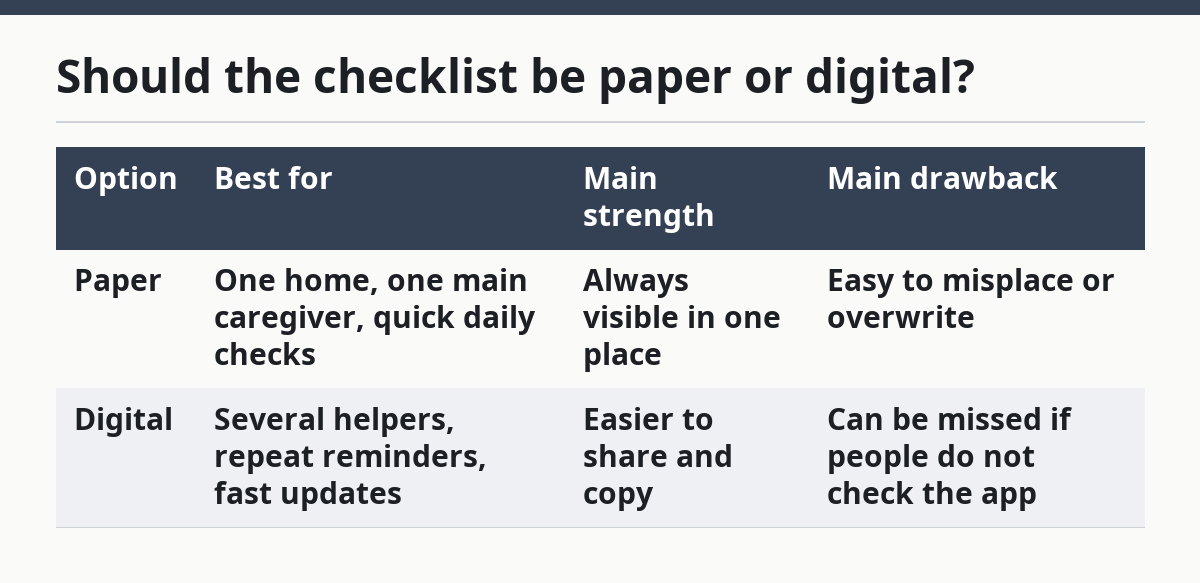
Paper works well when the caregiver wants a simple care checklist beside the calendar, especially for tasks that happen in the same room every day. Digital works better when a family helper or backup caregiver needs the same list from a different location, because edits can be shared faster. A phone reminder can also help with weekly items that get forgotten after a long day.
The trade-off is simple: paper is easier to see, digital is easier to repeat. If the person giving care does not like screens, forcing a digital system can create more missed tasks, not fewer. If the family is spread across more than one place, paper alone may not be enough.
A mixed setup often works best. Keep one master list in one place, then copy the daily task blocks into whatever format is easiest to check. That keeps the weekly plan stable while still letting each helper use the tool that fits the day.
What should a weekly review change?
A weekly review should change the checklist only when a task is slipping, repeated too often, or no longer needed. If nothing changes, the review is too long; if everything changes, the system is too unstable.
Use the review to check four things in 5 to 10 minutes. First, confirm which tasks were missed. Second, see whether the missed items need a new priority level. Third, check whether the family helper or backup caregiver still has the right assignments. Fourth, remove duplicate lines that crowd the page.
The review is also the right time to catch practical problems in the home. If the bathroom mat is still in the wrong place, if the path to the sink is cluttered, or if supplies ran low twice in a row, the checklist should reflect that next week. A weekly caregiving checklist should change with the home, not stay frozen after the first draft.
Keep the review short enough that it happens every week. A 30-minute planning session is too big for most families and often gets skipped. A 10-minute scan is more realistic and more likely to stick. The goal is not a perfect record; the goal is fewer missed tasks next week than this week.
For a broader caregiving routine, the National Institute on Aging and the Family Caregiver Alliance both have caregiver support material that can sit alongside a checklist system:
- National Institute on Aging: https://www.nia.nih.gov/health/caregiving
- Family Caregiver Alliance: https://www.caregiver.org/
What mistakes make checklists fail?
A checklist fails when it is too vague, too long, or too detached from the people doing the work. Those mistakes do not look dramatic, but they are exactly what leads to missed tasks.
One common mistake is listing chores instead of actions. “Morning care” does not tell anyone what to do first. “Brush teeth, check water cup, and open blinds” does. Another mistake is mixing every task into one giant list. That creates decision fatigue, especially when a family helper steps in for a single day.
A third mistake is giving the list no owner. A task without a name often waits until someone notices it is late. A fourth mistake is treating every item like a top priority. If everything is urgent, nothing is urgent, and the caregiver starts scanning the list instead of acting on it. If the care situation is medically complex, ask a clinician or care coordinator whether the priority system needs to be simplified. The National Institute on Aging caregiver guidance and Family Caregiver Alliance resources are useful references for that kind of planning.
The fix is plain. Write tasks as short actions, keep the list to the recurring items only, assign an owner, and use priority levels. If a task keeps slipping, move it to a higher priority or give it a reminder of its own. If a task never changes, do not review it every week unless there is a reason.
A weekly caregiving checklist is not a storage bin for every care note. It is a working page for the next 7 days.
What should go on a weekly caregiving checklist?
A weekly caregiving checklist should include daily task blocks, weekly review items, repeat reminders, and any handoff notes a family helper needs. It should also include priority levels for tasks that cannot wait. If the list is longer than one page or one screen, it likely holds too much.
How do I make sure tasks do not get missed?
Tasks are less likely to be missed when each one has one owner, one place to live, and one repeat reminder. A weekly review helps catch anything that was skipped or done late. If a task keeps being missed, move it to a higher priority and make it easier to see.
Should the checklist be paper or digital?
Use the format the caregiver will actually check every week. Paper is best when one person needs a visible list in one room, while digital is better when several helpers need the same update or reminder. A mixed system often works well when the master list stays stable and the reminders repeat on a phone or calendar.
Drafted with AI; not yet reviewed by a person.