Last updated: November 20, 2026
Quick Answer: A caregiver record-sharing plan for multiple family members usually works best with 1 master folder, 1 current care notes file, and 3 access levels: view, comment, and edit. Start with one shared folder, one main version of care notes, and clear permission levels, then decide who can view, edit, or only receive copies. This article on how to make a caregiver record-sharing plan for multiple family members shows how to keep updates organized without losing privacy or version control.
Key takeaways
- Pick one “source of truth” for care notes so siblings do not keep separate, conflicting files.
- Match each family member to a role before you share medical documents or private details.
- Use a shared folder with simple permission levels instead of sending the same file by text 10 times.
- Write down how edits happen, or the notes will drift after the first emergency.
- Keep the plan narrow: it is for record-sharing, not for replacing legal advice or a care handoff.
Who is this for?
This is for a family caregiver who needs several relatives to see the same medical documents and care notes without turning every update into a group chat mess. The topic here is how to make a caregiver record-sharing plan for multiple family members, and it assumes you already know the main players in the family, the kinds of records involved, and where at least one digital shared folder can live.
This is general information and not legal advice; rules on privacy, access, and record sharing vary by jurisdiction, so a qualified lawyer should be consulted for your own matter. For privacy basics, see the HHS Office for Civil Rights HIPAA guidance. It is most useful when one person is trying to keep a single record set while other relatives help from a distance, such as a sibling in another city or a backup helper who steps in only sometimes.
It is not the right tool if the family cannot agree on basic boundaries, such as who may see diagnoses, test results, or notes about bathroom safety and mobility; in that case, consult a professional who can help set the limits, and review the NIA guide to caregiving. It also is not enough when someone needs a formal legal access arrangement under local law. In those cases, the record-sharing plan can still sit beside the legal papers, but it should not try to replace them.
For background on the larger record-access topic, the hub on caregiver legal access and records is the next stop.
How do I make a caregiver record-sharing plan?
You make a caregiver record-sharing plan by choosing one master file system, assigning roles, and writing down update rules before the folder starts filling up. The point is not to store everything everywhere; it is to decide what lives in the shared folder, what stays private, and who does the next update after each visit or call. For a practical starting point, see the family care plan template.
-
List the tools: Open one notebook, one shared folder, and one care notes file; keep the folder name short, such as “Care Plan 2026,” and verify everyone can find it in under 1 minute. If two relatives already have different copies, that is the first sign the plan needs a single master version.
-
Choose the record owner: Name one person as the keeper of the master set of care notes; this person updates the source file, while others may read or comment. Verify the role is clear in writing, because a folder with three “owners” often turns into three different versions.
-
Sort documents by access level: Put medical documents into three groups: shared with all involved family members, shared only with the main caregivers, and held back from relatives who do not need that detail. Verify each group has a reason, because a folder with no limits is where privacy problems start.
-
Set folder permissions: Use the shared folder’s permission settings so some people can view only, some can comment, and only one or two can edit. Verify each person can open the correct files and cannot change the wrong ones; if the platform cannot do that, the setup is too loose.
-
Write update rules: Set one rule for when care notes change, such as after each appointment, hospital discharge, or weekend visit, and keep the rule to one page. Verify the family can repeat the rule in plain language; if they cannot, they will not follow it at 9 p.m. after a stressful call.
-
Add version control: Save each major revision with a date in the file name, such as “Care Notes 2026-11-20,” so nobody edits an old copy by mistake. Verify only one version is marked current; if two files both say “final,” the plan is already failing.
-
Decide on backup sharing: Give the backup helper the same view access as the main caregiver for the records they truly need, and remove access they do not need. Verify the backup can see emergency information in under 2 clicks; if they cannot, the plan is too slow for real use.
-
Test the handoff: Ask one family member to find a recent note, open the correct document, and read the latest change without help. Verify they land on the right version the first time; if they end up in a text thread or old attachment, the folder rules need repair. For a related step-by-step setup, see the hospital discharge checklist.
A simple shared folder on a phone is fine if the family is small and the records are modest. A more structured system may be needed if there are many relatives, repeated hospital visits, or a mix of private and shared details. The best plan is one people can keep using for 6 months without arguing over which file is current.
Who gets which documents?
Each person should get only the documents needed for the role they actually play. That is the cleanest way to reduce duplicate updates, prevent confusion, and keep private information from spreading farther than necessary.
A practical split looks like this:
| Person | Gets | Does not need |
|---|---|---|
| Main caregiver | Full care notes, current medical documents, update log | Every older draft |
| Backup helper | Current care notes, latest document set, emergency basics | Private family commentary |
| Distant sibling | Summary updates, selected medical documents, current version links | Raw notes from every visit |
| Relative who checks in now and then | Read-only summary | Edit access |
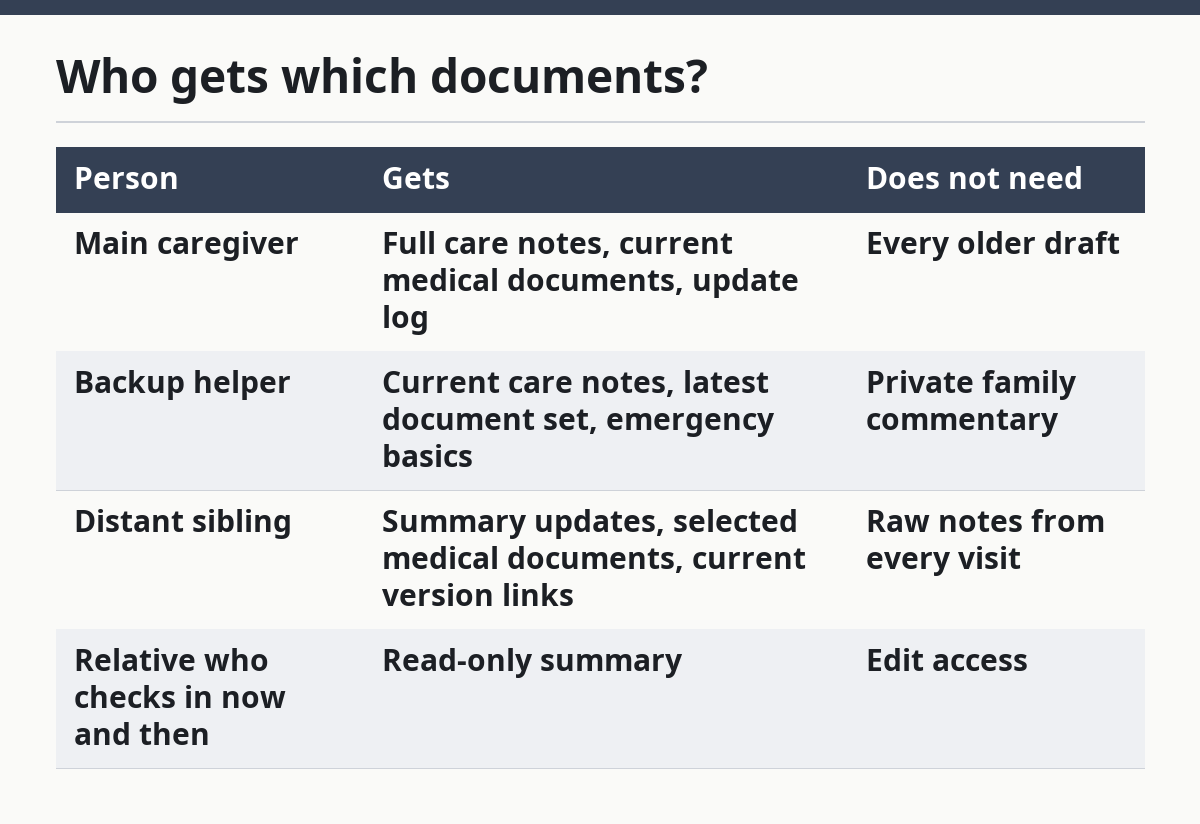
The key is not the family title but the task. If a sibling only wants to stay informed, that person does not need edit rights to the care notes or every medical document in the shared folder. If someone will step in as backup helper, then that person needs enough access to act without asking for a fresh file every time.
This matters because duplicate updates cause real damage. One relative may text a changed note, another may upload an older document, and a third may keep a printed copy from last month. After that, nobody is sure which version is current, and the family starts making decisions from stale information.
How do I avoid duplicate updates?
I avoid duplicate updates by setting one update path and one current file, then making every other path read-only or temporary. In a family setting, the easiest rule is that the master record changes in one place only, and every other version points back to that place.
The mechanism is simple: if people update the same facts in separate threads, they create mismatched records. One note may say a doctor changed a medicine, while another note still lists the old dose. A shared folder with version control cuts that risk because the date on the file tells everyone which copy to trust.
A good rule is “edit once, share many.” The record owner updates the main care notes, then posts the link or filename, not a fresh rewritten copy. If relatives want to comment, they do it in a comment field or reply thread tied to that one file, not in separate texts that wander away from the source.
The plan should also name a timing rule. Many families use a simple trigger such as “update after appointments, hospital stays, or major changes in care.” That keeps the file from being revised every time someone has a thought, which is how a useful folder becomes a cluttered archive.
What should stay private?
Private details should stay private unless the person receiving them truly needs them for the role they are playing. That usually includes limiting highly personal medical documents, family disputes, and sensitive notes about the person’s daily routines to a smaller group.
This is where the family often gets it wrong. A helpful relative may want to know everything, but wanting to know is not the same as needing to know. Privacy boundaries are part of the plan, not an insult to the family. They reduce the chance that medical details spread into the wrong hands or get repeated in messages that were never meant to be saved.
A useful boundary is to separate the records into “care action” and “context.” Care action includes what a helper needs to do next, such as the latest notes, appointment dates, and current documents. Context includes the fuller story, and that may stay with the main caregiver or one trusted backup helper.
If the family argues about what should be shared, stop and shrink the file set. Share the least amount needed for the task, then widen access only if there is a clear reason. That rule is especially useful when relatives live in different homes, use different phones, or are not equally involved day to day.
When should this plan stop and be adjusted?
This plan should stop and be adjusted when the family can no longer tell who may edit, who may view, and which file is current. That is the point where the record-sharing setup is doing the opposite of its job.
Two relatives are editing the same care notes file: two active editors usually means conflicting versions — switch to one editor and everyone else to view or comment only.
Someone keeps forwarding old attachments by text: that creates a second record trail — move the family back to the shared folder link and retire the old file.
Private medical details are reaching relatives outside the plan: the privacy boundary is too wide — cut access and share only the minimum needed for each role.
The backup helper cannot find the latest document fast: the plan is too hard to use in a hurry — simplify the folder structure and rename the current file clearly.
Family members disagree on what belongs in the shared folder: the plan is not settled — pause the sharing until the roles and access levels are written down.
The records are being used for legal questions about authority or rights: the plan is no longer just organization — get qualified legal help before relying on the folder for that purpose.
A record-sharing plan is a management tool, not a substitute for legal documents or a full care system. Once the disagreement is about rights, permissions, or authority, the family has moved beyond simple record sharing.
What mistakes do families make with shared folders?
Families usually make the same few mistakes, and each one has a clear cost. The fix is usually simpler than the mistake.
One mistake is giving everyone edit access. That leads to changed files, mixed dates, and no reliable master copy. The better choice is one editor, a few commenters, and everyone else in view-only mode.
Another mistake is using the same folder for everything. That turns medical documents, care notes, photos, and random messages into a pile of mixed files. Split the records by purpose so the person looking for the latest note does not have to sort through 40 unrelated items.
A third mistake is skipping version control. Without dates in file names, nobody knows whether “care notes final” is newer than “care notes final 2.” A date or revision label fixes that in a way that a plain title cannot.
A fourth mistake is not saying who the backup helper is. Then the family assumes someone else is watching the folder, and the update never reaches the person who needs it. The plan should name that role directly, even if the person only checks the file once a week.
A fifth mistake is trying to keep every relative equally informed. That sounds fair, but it creates noise and privacy problems. Fairness in a record-sharing plan means the right people get the right records, not that every person gets every file.
What does a good plan look like?
A good plan looks boring in the best way: one current folder, one current care notes file, a short list of who may see what, and a clear rule for updates. It is easy to explain in 2 minutes, and a backup helper can use it without searching through text threads.
The strongest sign is that different family members can answer the same question the same way: “Where is the latest version?” If one person says the folder, another says email, and another says a printed page in the kitchen, the plan is not done yet.
A workable plan also respects the legal boundaries in the family’s jurisdiction. It does not assume every relative has the same right to see medical documents, and it does not treat a shared folder as a legal authority. It simply keeps records in one place and makes access clear enough that the family can act without confusion.
The weaker version is easier to start, but it fails faster. A loose text-thread system may feel convenient for a week, then break the moment one relative misses a message. A written record-sharing plan is slower to set up than a text chain, but it can prevent the kind of mess that costs hours later.
How do siblings share care notes without confusion?
Siblings share care notes without confusion by using one master file, one editor, and a short update rule. The shared folder should hold the current notes, and every other person should use the same link or file name instead of saving separate copies. If the family cannot tell which note is current in 10 seconds, the system is too messy.
What should be in a shared caregiving folder?
A shared caregiving folder should hold the current care notes, the selected medical documents the family actually needs, and a clear update log. It should not become a dumping ground for every photo, text, and old file. If the folder has more than one version of the same document, the structure needs cleanup.
How do we keep private information limited to the right people?
Private information stays limited by matching access to role and using folder permissions that fit that role. The main caregiver and backup helper may need more detail than a distant relative, and that difference is normal. If the folder cannot limit access cleanly, the family should reduce what it stores there and keep sensitive notes elsewhere.
Drafted with AI; not yet reviewed by a person.